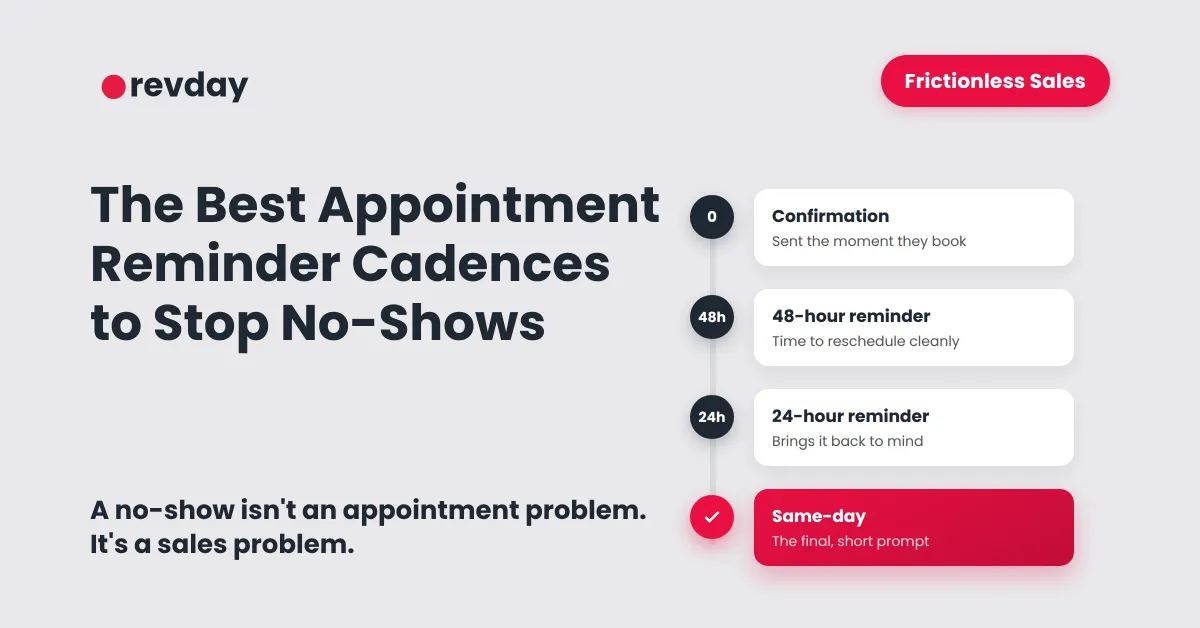
The Best Appointment Reminder Cadence to Stop No-Shows
A no-show does not just waste a slot in your calendar.
It wastes the time you protected, the preparation you did, and the sales momentum that existed when the person first booked.
For service businesses, no-shows are not only an appointment problem.
They are a sales process problem.
Someone showed enough interest to book a time. Then somewhere between booking and showing up, the process lost them.
That does not always mean they were a bad lead.
Sometimes they forgot.
Sometimes they were unsure.
Sometimes the appointment did not feel clear.
Sometimes they needed to reschedule but did not know how.
Sometimes there was no reminder strong enough to keep the next step visible.
That is why appointment reminders matter.
Not as a random calendar notification.
As part of your sales process.
This article sits under revday’s broader guide, Sales Pipeline Automation for Small Business: Build a Frictionless Process.
What causes appointment no-shows?
People miss appointments for many reasons.
Some are unavoidable.
But many no-shows happen because the booking process does not create enough clarity, commitment or follow-up.
A person may no-show because:
they forgot
they were unclear on the appointment purpose
the booking was made too far in advance
they were not ready to talk yet
they lost interest
they did not know how to reschedule
they did not receive a useful reminder
the appointment did not feel important enough
something changed and they did not know what to do next
Most founders see the no-show at the end.
They see the empty calendar slot.
But the issue usually starts earlier.
It starts when the appointment is booked without enough expectation-setting.
It starts when the confirmation message says little more than a date and time.
It starts when the lead has no simple way to confirm, cancel or reschedule.
It starts when the business assumes the person will remember.
A better system does not rely on the lead remembering.
It keeps the appointment visible and gives the person a clear next step.
Why reminders are part of your sales process
An appointment reminder is not just there to remind.
It is there to protect the next step in your sales process.
When someone books a discovery call, quote call, consultation or appointment, they are somewhere between interest and action.
They have not bought yet.
They have not fully committed yet.
They have simply agreed to the next conversation.
That means the time between booking and showing up matters.
A good reminder sequence helps:
confirm the appointment
reduce uncertainty
explain what the appointment is for
remind the person why they booked
make rescheduling easy
reduce last-minute silence
keep the lead inside your process
protect your calendar from wasted slots
This is why reminders belong inside your sales system.
They are not just admin.
They help maintain momentum.
For the full sales system behind this, read Sales Pipeline Automation for Small Business: Build a Frictionless Process.
The Show-Up System
The Show-Up System is the part of your sales process that confirms the appointment, reminds the lead, makes rescheduling easy and creates a recovery path if they do not attend.
It has four jobs.
First, it confirms the booking.
Second, it reminds the person before the appointment.
Third, it gives them a simple way to reschedule if they cannot attend.
Fourth, it tells your business what to do if they do not show.
Without this system, no-shows become messy.
You might manually message the person.
You might forget to follow up.
You might move on too quickly.
You might leave the lead sitting in your calendar with no pipeline update.
A good Show-Up System keeps the process clean.
The lead knows what is happening.
You know what is happening.
And if they miss the appointment, the next step is already clear.
The Best Appointment Reminder Cadence to Reduce No-Shows
Most service businesses need a reliable appointment reminder cadence that makes the booking clear, visible, and easy to manage.
A strong baseline sequence includes:
immediate confirmation after booking
48-hour reminder
24-hour reminder
same-day reminder
no-show recovery message if they do not attend
The exact timing can change based on your business.
A short online sales call may not need the same reminder sequence as a paid consultation, site visit or in-person appointment.
But the principle is the same.
The more valuable or involved the appointment is, the more important the reminder process becomes.
Immediately after booking
The first reminder is not really a reminder.
It is a confirmation.
This message should be sent immediately after the person books.
Its job is to make the appointment feel real.
It should confirm:
the date
the time
the appointment type
the location or meeting link
what the person should prepare
how to reschedule if needed
what will happen during the appointment
This is where many businesses are too vague.
A weak confirmation says:
“Your booking is confirmed.”
A stronger confirmation says:
“Your discovery call is confirmed for Tuesday at 10:00am. We will use this call to understand what you need help with, answer your questions and confirm the best next step. If you need to reschedule, use the link below.”
That second version gives the person context.
It reminds them why the appointment exists.
It also lowers the chance of confusion later.
48 hours before
The 48-hour reminder gives the person time to adjust.
This matters because not every no-show is intentional.
Sometimes people know they cannot attend, but they do not say anything because rescheduling feels annoying.
A 48-hour reminder gives them a clean chance to confirm or move the appointment.
The message should be short and practical.
It can say:
“Just a reminder, your appointment with [Business Name] is coming up on [Day] at [Time]. If this still works, no action needed. If you need to reschedule, use this link.”
The purpose is not pressure.
The purpose is clarity.
If they cannot make it, you want to know early enough to protect the slot.
24 hours before
The 24-hour reminder brings the appointment back to mind.
This is especially useful when people book several days or weeks ahead.
By the day before, the person may have forgotten what they booked, where the link is, or what they need to prepare.
A 24-hour reminder should include:
appointment time
appointment type
location or meeting link
simple preparation note
reschedule option
For example:
“Reminder: your [Appointment Type] with [Business Name] is tomorrow at [Time]. Here is the meeting link: [Link]. Please bring any questions you want covered. If you need to reschedule, use this link.”
This reminder reduces uncertainty.
It also helps the appointment feel planned, not casual.
Same day
The same-day reminder is the final prompt.
This is the message that catches people who forgot, got busy or lost the meeting link.
For online calls, send the meeting link again.
For in-person appointments, include the address.
For phone calls, remind them who will call whom.
A same-day reminder might say:
“Your appointment with [Business Name] is today at [Time]. Here is the link: [Link]. Speak soon.”
Or:
“Your site visit with [Business Name] is today at [Time]. We will meet you at [Address]. If anything changes, reply here.”
The same-day reminder should be short.
Do not overload it with details.
At this point, the job is to make showing up easy.
SMS, email or both?
SMS and email do different jobs.
SMS is useful for short, time-sensitive reminders.
Email is better for detail, preparation and context.
For many service businesses, the best approach is to use both.
Use email when you need to explain:
what the appointment is for
what the person should prepare
what documents or details are needed
what happens before or after the appointment
any policy, fee or cancellation terms
Use SMS when you need to prompt action quickly.
SMS is good for:
appointment reminders
same-day prompts
quick confirmations
reschedule links
“we are about to call you” messages
no-show recovery messages
Do not make SMS messages long.
People should be able to understand them at a glance.
A good SMS reminder is short, specific and easy to act on.
A good email reminder gives more context without feeling heavy.
Appointment reminder templates for service businesses
Templates are useful, but they should not sound robotic.
Use them as a base and adjust them to match your business.
The best reminders sound calm, clear and helpful.
They do not guilt the person.
They do not over-explain.
They do not sound desperate.
Booking confirmation SMS
Hi [First Name], your [Appointment Type] with [Business Name] is booked for [Day] at [Time]. If you need to reschedule, use this link: [Link].
Booking confirmation email
Subject: Your appointment with [Business Name] is confirmed
Hi [First Name],
Your [Appointment Type] is confirmed for [Day] at [Time].
We will use this appointment to [briefly explain purpose].
Before the appointment, please [simple preparation step].
If you need to reschedule, you can use this link: [Link].
Thanks,
[Business Name]
48-hour SMS reminder
Hi [First Name], quick reminder that your [Appointment Type] with [Business Name] is in 2 days on [Day] at [Time]. If you need to reschedule, use this link: [Link].
24-hour SMS reminder
Hi [First Name], reminder that your [Appointment Type] with [Business Name] is tomorrow at [Time]. Here is the link/details: [Link or Address].
Same-day SMS reminder
Hi [First Name], your appointment with [Business Name] is today at [Time]. Here are the details: [Link or Address]. Speak soon.
Reschedule message
Hi [First Name], no problem if the original time no longer works. You can choose a better time here: [Link].
No-show recovery message
Hi [First Name], looks like we missed you for today’s appointment. These things happen. If you still need help, you can reschedule here: [Link].
Sales call no-show recovery message
Hi [First Name], we missed you for today’s call. If this is still something you want help with, you can book another time here: [Link]. If now is not the right time, no worries.
Paid appointment no-show message
Hi [First Name], we missed you for your appointment today. You can reschedule here: [Link]. Please note our booking terms apply for missed appointments.
Use this kind of message only if the person was clearly told the policy before booking.
Do not surprise people with a policy after the no-show.
What should happen when someone confirms, cancels or reschedules?
A reminder sequence is not only about sending messages.
It should also update your system based on what the person does.
If someone confirms, your system should keep the appointment active.
If someone reschedules, the calendar should update and the lead should stay in the right sales stage.
If someone cancels, they should not disappear. They should move to the right next step.
If someone does not reply, they may need a final reminder.
If someone no-shows, they should move into a recovery path.
This is where reminders connect to pipeline automation.
The appointment behaviour should change what happens next.
For example:
When someone confirms, the appointment stays active.
When someone reschedules, the old appointment is replaced and the new appointment is confirmed.
When someone cancels, they move to Reschedule Needed or Nurture.
When someone no-shows, they move to No-Show Recovery.
When someone rebooks, they move back to Call Booked.
This matters because a no-show should not sit silently in your calendar.
It should create a next step.
Future deep dive to link when published: Moving Leads Through Your Pipeline Automatically Based on Actions.
The no-show recovery sequence
A no-show does not always mean the lead is dead.
Sometimes they forgot.
Sometimes they got pulled into something else.
Sometimes they still want help but feel awkward about missing the appointment.
Your recovery sequence should make it easy for them to re-engage without feeling shamed.
A simple no-show recovery sequence can look like this.
Step 1: Send a calm same-day message
Send this shortly after the missed appointment.
Keep it human.
Example:
“Hi [First Name], looks like we missed you for today’s appointment. These things happen. If you still need help, you can reschedule here: [Link].”
The tone matters.
Do not sound annoyed.
Do not lecture.
Do not make it awkward.
Your job is to reopen the path.
Step 2: Update the lead status
The lead should not stay in Call Booked if they did not attend.
Move them into a stage like:
No-Show Recovery
Reschedule Needed
Missed Appointment
Follow-Up Due
The exact name matters less than the visibility.
You need to be able to see that this lead has not completed the next step.
Step 3: Create a follow-up task
If the person does not rebook, your system should create a follow-up task.
This could be same day, next day or a few days later.
The task might be:
“Check if [First Name] wants to reschedule.”
This keeps the lead from disappearing.
Step 4: Send one final check-in
If they do not respond after the first recovery message, send one final check-in.
Example:
“Hi [First Name], just checking whether you still wanted help with [topic/service]. If now is not the right time, no problem. If you would still like to talk, you can book a new time here: [Link].”
This gives them an easy way back in.
It also gives you permission to stop chasing if they are no longer interested.
Step 5: Move them to nurture if they do not respond
If the person does not reply or rebook, they do not need to stay in your active sales pipeline forever.
Move them to a nurture stage.
That way, they can still hear from you over time without staying on your urgent follow-up list.
The goal is not to chase forever.
The goal is to keep the relationship open without relying on memory.
Should you use deposits or no-show fees?
Sometimes deposits or no-show fees make sense.
Sometimes they do not.
It depends on the type of appointment.
For paid appointments, consultations, site visits, treatments or limited-capacity sessions, a deposit or cancellation policy may be appropriate.
For free discovery calls or sales calls, a no-show fee may create unnecessary friction.
In those cases, better qualification, reminders and rescheduling paths may be more useful.
Before using a no-show fee, ask:
Is this appointment high-value or limited-capacity?
Does the no-show create a real cost to the business?
Was the policy made clear before booking?
Does the policy match the relationship you want with the client?
Would a deposit be better than a penalty?
Would better reminders solve most of the issue?
A no-show policy should never feel like a surprise.
It should be clear before the person books.
For many service businesses, the better starting point is not a fee.
It is a cleaner booking and reminder process.
What to automate and what to keep human
Appointment reminders should reduce manual admin.
They should not make your business feel cold.
The best setup combines automation with human judgement.
Automate this
Automate the repeatable steps:
booking confirmations
SMS reminders
email reminders
reschedule links
same-day reminders
no-show recovery messages
internal notifications
pipeline updates
follow-up task creation
These are the parts that should not depend on your memory.
Keep this human
Keep the sensitive or high-value parts human:
high-value sales follow-up
pricing conversations
objections
complaints
repeated no-shows
sensitive client issues
relationship repair
final decision conversations
Automation should protect the process.
It should not replace the relationship.
A good reminder system feels professional, not pushy.
Choosing the Right Tool for the Job (Cal.com, Calendly, or a CRM)
Building this cadence requires the right software. Many business owners start with standalone calendar tools like Cal.com or Calendly to handle their automated reminders and follow-ups. While tools like Cal.com are great for basic scheduling, they often fall short when a lead actually no-shows and needs to be moved into a long-term nurture sequence.
To truly stop no-shows, your calendar needs to talk directly to your sales pipeline. That is why using an integrated CRM allows you to trigger robust no-show recovery paths, automatically update lead statuses, and alert your team, all without duct-taping different software together.
What this looks like in service businesses
The reminder sequence should match the type of appointment.
A free discovery call does not need the same process as a paid consultation, site visit or treatment appointment.
The principle is the same.
The person should know what they booked, why it matters, and how to reschedule if needed.
Consultant or coach
A lead books a discovery call after filling out a form or taking a quiz.
The system sends a confirmation email explaining the purpose of the call.
They receive a reminder 24 hours before and a short SMS on the day.
If they no-show, they receive a calm reschedule message.
If they do not rebook, they move into nurture.
This protects the founder from manually chasing every missed sales call.
Home Service Companies (Trades, Plumbers, Electricians)
How appointment confirmation messages reduce no-shows for home service companies:
A customer books a quote call or site visit. The system confirms the appointment immediately and asks them to have site access or details ready.
The system confirms the appointment and asks them to have details ready.
They receive a reminder the day before and another on the day.
If they need to reschedule, they can use a link instead of calling or texting back and forth.
If they no-show or are not available when the trade arrives, the system creates a follow-up task.
This protects travel time and keeps quote opportunities visible.
Health or wellness provider
A client books an appointment.
They receive a confirmation with location, preparation details and cancellation terms.
They receive reminders before the appointment.
If they cancel, they are given a rebooking path.
If they no-show, the system sends a clear message and updates the client record.
This keeps the appointment book cleaner and reduces manual chasing.
Creative service provider
A potential client books a project discovery call.
The system confirms the appointment and asks them to prepare project goals, timeline and budget range.
They receive reminders before the call.
If they miss the appointment, they get a reschedule message.
If they do not respond, they move into a nurture list instead of staying in the active sales pipeline.
This keeps the pipeline clean and makes follow-up easier.
Appointment reminder checklist
Use this checklist to review your current appointment process.
Do people receive a confirmation immediately after booking?
Does the confirmation explain what the appointment is for?
Do they know how to prepare?
Do they know how to reschedule?
Do they receive a reminder before the day?
Do they receive a same-day reminder?
Does the reminder include the meeting link, address or call details?
Can they confirm, cancel or reschedule easily?
Does a cancellation update your calendar?
Does a no-show update your pipeline?
Is there a recovery message after a no-show?
Is there a follow-up task if they do not rebook?
Do no-show leads move out of the active booked-call stage?
Are not-ready leads moved into nurture?
If you answered “no” to several of these, the issue may not be your leads.
The issue may be that your booking and reminder process is not protecting the next step.
Take the Clarity Quiz to diagnose where your sales and booking gaps are.
FAQs
How do you reduce appointment no-shows?
You reduce appointment no-shows by confirming the booking immediately, sending reminders before the appointment, making rescheduling easy and following up quickly if someone misses the appointment.
The goal is to keep the appointment visible and give the person a clear next step.
Do SMS reminders reduce no-shows?
SMS reminders can help reduce no-shows because they are short, visible and easy to act on.
They work best when paired with a clear confirmation message and a simple reschedule path.
When should appointment reminders be sent?
A simple reminder sequence is to confirm immediately after booking, remind the person 48 hours before, then send another reminder 24 hours before or on the day of the appointment.
For higher-value or in-person appointments, use both a day-before and same-day reminder.
What should an appointment reminder text say?
An appointment reminder text should include the person’s name, appointment time, business name, location or meeting link, and a clear way to reschedule.
Keep it short, friendly and specific.
What do you say to a no-show client?
Keep the message calm and practical.
Let them know they missed the appointment, offer a simple reschedule path, and only mention policies if those terms were made clear before booking.
Should I charge a no-show fee?
A no-show fee can make sense for paid appointments, limited-capacity services or appointments that create a real cost when missed.
For free sales calls, better qualification, reminders and reschedule paths are often a better first step.
How many appointment reminders should I send?
Most service businesses should send at least two messages: a confirmation after booking and a reminder before the appointment.
For higher-value or in-person appointments, add a 48-hour reminder, a 24-hour reminder and a same-day prompt.
How do automated appointment reminders work?
Automated appointment reminders are messages sent by SMS or email at set times before an appointment.
They can also include confirmation, cancellation or rescheduling options so the business does not have to chase manually.
Final thought
A reminder is not just a reminder.
It is a handover between interest and attendance.
When someone books an appointment, they have taken a step towards working with you.
Your job is to protect that step.
A good reminder sequence keeps the appointment visible, reduces confusion, gives the person a way to reschedule, and creates a recovery path if they do not show.
That is how reminders become part of your sales process.
Not because they fill someone’s phone with notifications.
Because they help the next step actually happen.